Insert photos as images in Excel
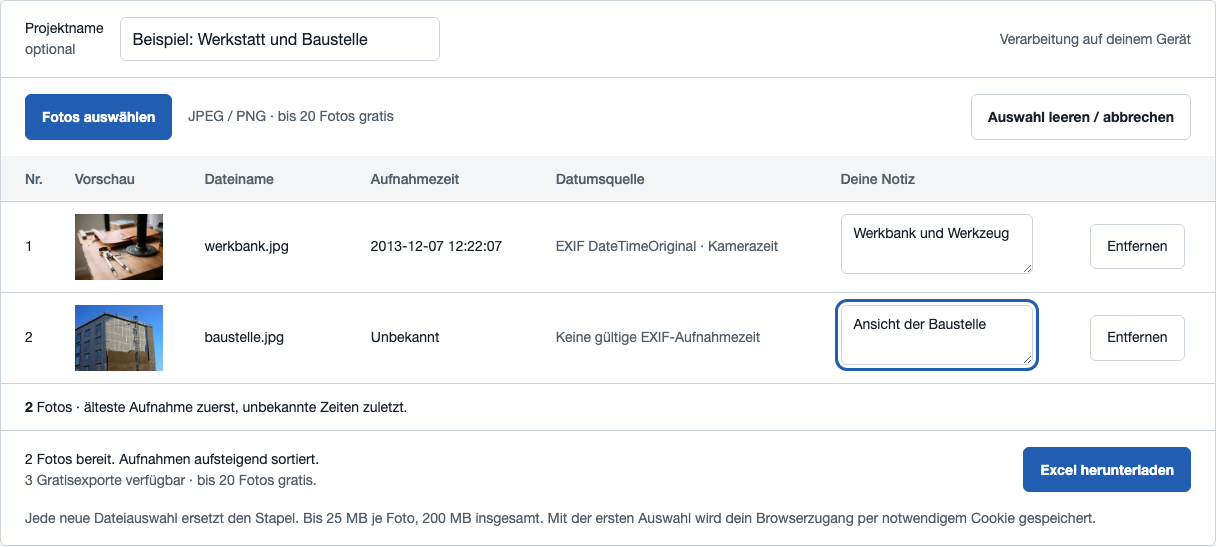
A photo list keeps pictures and descriptions together. NEUMEN Foto Excel creates a workbook with one row per photo: an image preview, filename, capture time and your own note.
A photo list or text recognition?
This tool keeps your photos as images. To turn numbers in a photographed table into editable cells, you need optical character recognition (OCR). That is a different task and is not included in Foto Excel.
Three steps to a photo list
- Select your photos. Import JPEG or PNG files. Images are processed on your device. Each new selection replaces the previous batch.
- Check order and notes. Sort by capture time, natural filename or file size, ascending or descending. Import order is also available. Optionally add a project name and individual photo notes. Expand the list to see more than four photos.
- Create the Excel file. Selection and preview are free. Export requires a verified account and purchased credits or a subscription. An export includes the entire selected batch, even when the preview is collapsed. Offers and purchase availability.
What is inside the workbook?
The XLSX file contains reduced-size image objects, filenames, capture times and notes. A separate notes sheet records the project name, sort order and files that were not processed. Original photos are not included; the workbook does not replace a photo archive.
Download a real example workbook
Sorting the workbook later in Excel may move the image objects. Set your preferred order in the tool before exporting.
Missing dates and file limits
Only EXIF DateTimeOriginal is used as capture time. Missing or invalid values appear as “Unknown” and are placed last when sorting by capture date. The file date is not substituted. Metadata can be changed and does not prove authenticity.
Up to 100 JPEG/PNG photos per export, 25 MB per photo, 200 MB per batch and 40 megapixels per image. Damaged or unsupported files are reported visibly. HEIC, RAW, TIFF and animated images are not promised. Devices with limited memory may fail sooner.
Checked on this Mac with Chromium and WebKit; workbooks have been opened in Microsoft Excel in read-only mode. Windows, LibreOffice and real mobile devices have not yet been accepted.
Work online or offline
The online version also processes photos locally. Sign-in, balances and purchases require a connection. The separate offline package includes the required libraries and works after extraction without Internet, activation or a subscription.